Showing posts with label April Fools Day. Show all posts

Google Releases Windows Phone App for Google Reader

Donal Trung 2:57 PM Add Comment
Google is about to launch its second Windows Phone app. This time, Google picked a service that was used by a few million users until it was discontinued last year: Google Reader.

While the new app won't be able to show the latest news from your feeds, it's a clear sign that Google started to embrace Microsoft's mobile platform. Apparently, Google was about to launch the app in January 2013, but developers were busy updating Google's apps for Android and iOS. A week ago, someone found the app and decided it's a good idea to release it. The application lets you login to your Google account and shows this message: "Google Reader has been discontinued. We want to thank all our loyal fans. We understand you may not agree with this decision, but we hope you'll come to love these alternatives as much as you loved Reader."


It's simple, minimalist and pretty late, just like Windows Phone.

Gmail, Back to 2004

Donal Trung 2:11 PM Add Comment
To celebrate 10 years of Gmail, Google will launch a special Gmail interface that takes you back to 2004, when Gmail was launched. The retro interface doesn't include a contact manager, drafts, a rich text editor and other advanced features. Gmail will only show the most recent messages, since the storage is limited to 1GB.


Source: Kevin Fox

Update: This is a joke for April Fools' Day 2014.

NS5, Free Phone From Google

Donal Trung 1:59 PM Add Comment
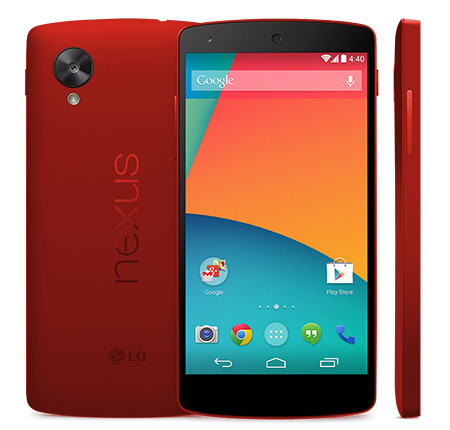
Google is about to launch a free phone that will be called NS5. It's a free 8GB version of Nexus 5 ("Nexus Special 5") that will only be available in the US. You'll still have to pay $50, but you'll get $50 Google Play credit, so the phone is actually free.

NS5 will only be available online at the Google Play Store. It comes with a special version of Android KitKat that installs some new software, adds new features and restricts a few options. Chrome's data compression proxy is now used at the OS level, so all the traffic is routed through Google's servers and you can't disable this feature. Your phone is associated with a Google account, you can no longer disable location services or Google+ Auto Backup and there's a new sponsored card in Google Now that shows personalized recommendations. You'll also hear some relevant audio ads when calling companies or when you play your music.


It's a great opportunity for Google to test new software, find new ways to monetize its services and capture the value of free hardware. Building a platform that makes mobile phones accessible for everyone has always been at the heart of Android.

Update: This is a joke for April Fools' Day 2014.

Google Maps for Android Adds Feeling Lucky Button

Donal Trung 1:18 PM Add Comment
The latest version of Google Maps for Android adds an "I'm Feeling Lucky" button that automatically picks the destination when searching for directions. This only works when "my location" is selected as the starting point and Google has enough information to offer relevant recommendations.


The "I'm Feeling Lucky" option works especially well when it's obvious where you are going, for example when you're heading home from work. Google uses information from Gmail, Google Calendar, Google+, Google Search history, Google Maps history, Google Trends, Google Drive, Chrome and even Google Reader. The power of Google Reader's data is yet to be fully unlocked, but there's a lot of potential.

Update: This is a joke for April Fools' Day 2014.

Google April Fools' Day 2014

Donal Trung 11:09 AM Add Comment
It's that time of the year: the day when Google's teams from all over the world come up with so many hoaxes that it's hard to list all of them. It's Google April Fools' Day.

Google Japan found an innovative input method for smartphones: the Magic Hand. "Once you have set in front of this device a smartphone on hand, just hold the lever afterward. Instead of you, magic hand takes care of operating the smartphone. Problem of the touch panel of the past, I can solve all. Operability of comfortable buttons and levers, will make for some of the space further, the mobile life of you." (machine translation) More details here.


Gmail celebrates its 10th anniversary by adding a new feature: Gmail Shelfie. "You all love setting selfies as your custom theme in Gmail, but you've told us there's one major problem: there isn't a way to share your selfie with others. As the pioneering platform for selfies, Gmail is committed to being at the forefront of innovation in the selfie space. Today, we're proud to free your selfies by launching Gmail Shelfie, the SHareable sELFIE. Gmail Shelfie is built on the idea that you shouldn't be selfish with your selfie. With just a few clicks, your mom, your aunt, or that girl you have a crush on can set your Shelfie as their Gmail theme so they can enjoy checking, reading, and writing emails while seeing your friendly face in the background."


This feature is rolling out over the next few hours. Just enable the "Trending Shelfies" Gmail theme to see some funny Shelfies.


Google Maps lets you find Pokémon. "If you think you're up to the challenge, grab your Poké Ball and the newest version of Google Maps for iPhone or Android. Then tap the search bar, 'press start,' and begin your quest. Leave no stone unturned or city unzoomed as you seek out wild Charizards and Pikachus to add to your Pokédex. Be vigilant — you never know if a wild Steelix will appear in Tokyo, Japan or New York City, USA."


Nest "teams up with Virgin America to reinvent the way people fly. Watch as Tony Fadell and Sir Richard Branson introduce Total Temperature Control, the newest product from Nest."


Google introduces Auto Awesome Photobombs, so that anyone can get a celebrity photobomb. "We're starting with surprise appearances by David Hasselhoff, everyone's favorite crime-fighting rockstar lifeguard. Upload a new self-portrait, or a group photo with friends, and leave some room for The Hoff. He might just make your photo a little more #Hoffsome."


Google Chrome announced "Google Translate support for Emoji, built directly into Chrome for Android and iOS. You can now read all your favorite web content using efficient and emotive illustrations, instead of cumbersome text. To view webpages in Emoji today on your Android and iOS devices, make sure you have the latest version of Chrome for Mobile from the Play Store or App Store. Then simply tap on the menu icon and select the 'Translate to Emoji' option. Tap 'Reload' to view the original page. This feature is currently only available in English.


There's also Chromecast for squirrels. "A new era of squirrel entertainment is upon us. No longer will squirrels be restricted to watching human music and videos on TV."


Waze announced "the acquisition of Israeli social enterprise software SingleSpotter, and the subsequent launch of its most social feature yet: WazeDates. After a successful limited beta in San Francisco and Tel Aviv, the feature will launch as an expanded pilot to all Wazers mid-April 2014, allowing drivers to take the same hands-on approach to their personal life as they do to fighting traffic. WazeDates, powered by SingleSpotter, alerts drivers to other likely singles on the road nearby. Wazers can adjust preferences to search for drivers based on age, sex, orientation and more. Once a desirable driver is found, users simply invite them to a destination by sharing their ride, or use Map Chat to say hello."


Google Play Signature Edition adds support for a new way to distribute Android apps. "With Signature Edition, you can bring back the physical connection to your users. App delivery is completed via USB drives shipped in carefully crafted boxes, each proudly bearing your signature. This not only gives your users the very latest version of your app, but also adds a personal touch that is so often missing in our modern digital age."


AdSense shows a list of the top planets and moons:


YouTube announces the upcoming viral video trends: clocking, baby shaming, Glub Glub, elaborate divorces, kissing dad and more.


Chrome can now detect cat input using the Qwerty Cats extension. "We've designed a cat-friendly on-screen keyboard, based on extensive Animal-Computer Interaction (ACI) research. You or your cat can install the kitty keyboard and try these features: four pawing modalities using your trackpad or touchscreen, mouse mode, cat translation technology (beta)."


AutoAwesome can make your resume stand out:


There's even a dogengineer job at Google. You need to "write much web-based code, very programming, so participation in code review, much scary, no cry pls, type type type on computer, very building, much system OS/corn, such complicate."


Google also launched "a full translation of Blockly in Klingon". This version of "Blockly has no syntax errors. This reduces frustration, and reduces the number of computers thrown through bulkheads. Debugging and bug reports have been omitted, our research indicates that in the event of a bug, they prefer the entire program to just blow up." Apparently, "less than 2% of Google engineers are Klingon". You can try a demo here.


Google Helpouts lets you "increase your pirate vocabulary". "Ahoy mateys, if ye wanta' speak like a pirate this be yer ship. From 'ahoy' t' 'yo-ho-ho,' ye'll sound like seven seas marauders faster th'n a scalawag gits scurvy".


{ Thanks, Mark Stead, François Beaufort and Scowlin' Guideon Scabb. }

Google April Fools' Day 2011

Donal Trung 3:51 AM Add Comment
This year, Google's hoaxes are less inspired and some of them aren't original either, but they're still funny. Here are some of them:

1. Google China invented teleportation. "Through the search is to let Google take you through time and space, most want to reach your arrival time, place, with an immersive way to perceive everything you want to perceive." (machine translation)


2. Gmail Motion is a new way to control Gmail using body language. "To use Gmail Motion, you'll need a computer with a built-in webcam. Once you enable Gmail Motion from the Settings page, Gmail will enable your webcam when you sign in and automatically recognize any one of the detected movements via a spatial tracking algorithm. We designed the movements to be easy and intuitive to perform and consulted with top experts in kinestetics and body movement in devising them."


There's also Google Docs Motion, "a new way to collaborate -- using your body".


Opera had a similar hoax two years ago: Opera Face Gestures.

3. Google hires autocompleters. "Are you passionate about helping people? Are you intuitive? Do you often feel like you know what your friends and family are thinking and can finish their thoughts before they can? Are you an incredibly fast Google searcher? Like, so fast that you can do 20 searches before your mom does 1?" If you have have "good typing skills (at least 32,000 WPM)", you're willing to "relocate to obscure places like Nauru and Tuvalu to develop knowledge of local news and trends" and you have a "certificate in psychic reading", then you can get a job at Google.


4. Search for Helvetica or Comic Sans using Google, and you'll have a little surprise. Google plans to use Comic Sans as the default font across all Google products, but you can use the Comic Sans for Everyone extension to browse the entire World Wide Web using Comic Sans. It's fun, fun, fun.


5. YouTube presents the top viral videos in 1911. "Today, we celebrate 100 years of YouTube, and we thought we would reflect on our inaugural year with a re-print of our first blog post from 1911. In honor of this milestone, today's homepage is a reproduction of how you might have viewed it 100 years ago. Check out some of the most popular videos of the time and be sure to try out our new upload mode which summons a horse-drawn carriage to pick up your video submission from your home."


6. Google Body Browser was replaced by Google Cow.


7. Google will buy Blogger once again. "This morning we're beyond thrilled to announce that Blogger has signed a definitive agreement to be acquired by Google, the Internet search company. This is exciting news not only for all of us on the Blogger team, but for our users, our partners, and most importantly -- the blogosphere itself."

8. Google AdWords offers a new ad format: Blimp Ads. "Imagine this: a baseball stadium, packed with thousands of fans. A home run flies through the air, and as the crowd looks up, they see your ad, bigger than ever, hand-painted on the side of a majestic blimp. Blimp Ads can make this a reality."


For those who are afraid to try new things, Google brings back old school ads: "Punch the monkey!", "Congratulations, you've won $100,000!", "Click here for smileys", pop-ups and more.

9. Another company has gone Google: Contoso, "a fictional company used by Microsoft as their example company and domain". The explanation is pretty clear: "As a subsidiary of a traditional software company, we went against the grain and switched all 1,200 Contoso employees across nine continents to the cloud. After previously considering Google Apps, we were finally convinced to make the move when Google Docs began supporting the Corsiva font. I still can't find track changes in Docs, but now we can use Corsiva from anywhere, on any device. We decided against Microsoft® Office 365 beta, because we'd heard for years that beta software was too risky."

10. Google Maps and Google Earth added 10 real-world sightings to the maps. "It all started with a recent visit to my friend Nessie in Boston. As I crossed the bridge into town, the car in front of me stopped short so I slammed on the brakes. The cars next to me were also stopped, so I got out to see what was causing the back up. There was a huge, red lobster sitting on the bridge."


Your mission is to find the other 9 sightings.

11. Google Voice Search now supports Pig Latin. "What is Pig Latin you may ask? Wikipedia describes it as a language game where, for each English word, the first consonant (or consonant cluster) is moved to the end of the word and an “ay” is affixed (for example, 'pig' yields 'ig-pay' and 'search' yields 'earch-say')." The nice thing is that this actually works: open Voice Search for Android or Google Search for iPhone, change the language to Pig Latin and try your luck. This English to Pig Latin translator might help.

"To configure Pig Latin Voice Search in your Android phone just go to Settings, select 'Voice input & output settings', and then 'Voice recognizer settings'. In the list of languages you'll see Pig Latin. Just select it and you are ready to roll in the mud! It also works on iPhone with the Google Search app. In the app, tap the Settings icon, then 'Voice Search' and select Pig Latin."

Here's a video that announces the new feature. Watch it and Mike LeBeau's fan club will thank you.


12. Chrome's team came up with Chromercise, a finger fitness program that helps you increase your hands' strength and dexterity. "Some existing finger exercise programs focus on upgrading your digits' cardiovascular strength and musculature; others focus on dexterity. Chromercise's unique blend of aerobic motion and rhythmic accompaniment covers all of the above while simultaneously tightening and toning your fingers' actual appearance," informs Chrome's blog.

Check out the video because it's really funny (probably the funniest Google hoax this year):


13. If Chrome is not fast enough for you, use ChromeLite, an extension that harnesses the power of text-only browsers. "In our never-ending quest for speed, our team members recently gathered to race the latest and greatest browser versions against each other. Much to our surprise, the winning browser was neither the latest version of Chrome nor another modern browser, but was instead an early text-based browser called Lynx," explains Google.

Coincidentally, Lynx was the Google Browser from my 2006 April Fools' joke and 2006 was the year when Google started developing Chrome.


14. Search for [kittens] using a mobile phone and the top results will show a lot more than you expect. Refresh and everything will seem random.


{ Thanks, everyone. }