Showing posts with label Web Search. Show all posts

Hangouts Integration in Google Search

Donal Trung 2:14 PM Add Comment
Some of the phone numbers from Google's Knowledge Graph cards are now linked and open Google Hangouts. When you search for a local business, Google usually displays the phone number next to the address. Click the phone number and you can call directly from your browser using Google Hangouts, which opens in a pop-up window and informs you about the fees. Calls made to the U.S. and Canada are free.


For searches like [john radcliffe hospital phone number], Google shows a separate card that includes the phone number.


It's interesting to notice that not all phone numbers are clickable. Phone numbers from local search results or from ads don't have links. Another exception: customer service numbers.


{ via Search Engine Roundtable }

Google Account History

Donal Trung 11:40 AM Add Comment
Google's Account Settings page has a new section called "Account History". The section shows some links that let you manage Google search history, Google location history, YouTube search history and watch history (the videos you've watched).


Google also includes "pause" buttons for all the 4 data streams. When you click "pause", Google shows black-and-white pictures and tells you what you'll be missing.

"Pausing Google Search History may limit or disable features such as Google Now, more accurate search results and predictions, and saved searches on mobile devices. Pausing Google Location History will limit the functionality of some Google products over time, such as Google Maps and Google Now. Pausing YouTube Search History does not delete existing history. To view your history, remove individual items, or clear your entire history, go to your YouTube Search History page."


Here's what happens when you pause Google search history, Google location history, YouTube search history and watch history: the colorful images are converted to black and white.


YouTube's watch history is really useful because it shows all the videos you've watched from any device, as long as you are logged in. Unfortunately, YouTube doesn't provide a search feature, so you have scroll until you find the right video. YouTube's watch history is the most important source for YouTube's recommendations, so you should delete some of the videos if you see unpleasant recommendations. Google also uses video history to improve ads, but you can opt out of interest-based Google ads.


YouTube's search history is used to show search suggestions and to improve recommendations. The first two suggestions from the screenshot below are from my search history:


Google search history is used to show search suggestions, to restrict results to pages you've visited, to personalize search results, to improve ads and to provide data for some Google Now cards. There's an important distinction between YouTube search history and Google search history: YouTube only saves your queries and the watch history is saved separately, while Google search history includes both your queries and the search results you've clicked on.


Location History started as a Google Latitude feature, but it's still available, even if Google Latitude was discontinued. To understand Location History, you need to know what Location Reporting is.

"Location Reporting allows Google to periodically store and use your device's most recent location data in connection with your Google Account. Location History allows Google to store a history of your location data from all devices where you are logged into your Google Account and have enabled Location Reporting."

Both features are related to mobile devices and they're used by Android/iOS apps like Google Maps, Google Search and Google+. Location History requires Location Reporting, but you can use Location Reporting while disabling Location History. Google uses your data to improve Google Maps search results based on the places that you've been, to show some Google Now cards and to show your data on a map. Here are some ways to disable Location History and Location Reporting from an Android device.


{ Thanks, Herin Maru. }

Gay Google (2014)

Donal Trung 7:46 AM Add Comment
Just like last year, the year before and in fact every year since 2008, Google shows some special decorations when searching for [gay], [lgbt], [lesbian], [transgender], [queer] and other queries that include these words. It's the LGBT Pride Month and Google made the search navigation menu more colorful.


You can also check the colorful decorations from 2008, 2009, 2010, 2011, 2012 and 2013.

{ via Search Engine Roundtable }

Google Shows Step-by-Step Instructions

Donal Trung 7:07 AM Add Comment
I mentioned a few months ago that Google now answers complicated questions. Depending on your query, you might see a long answer obtained from a web page.

Google's answers also include lists. Here are some examples from a Gmail support page and an Apple support page:


When searching for [gmail export contacts], Google now lists the steps right on the search results page, so you don't have to click the search result and find the answer.

Here's a similar example for [icloud restore]. Notice how Google removes some of the text from the article to keep it brief.


The answers aren't limited to tech-related queries. You can also find [how to remove a popcorn ceiling], [how to install a toilet], [how to change a tire], [how to boil eggs] and more.


Google's Site Info Cards Use DMOZ Descriptions

Donal Trung 2:49 PM Add Comment
When Google added site info cards for search results, I noticed that Google only used information from Wikipedia. If a site or an organization didn't have an associated Wikipedia article, the info card wasn't displayed. Now Google also uses descriptions from the Open Directory Project (DMOZ), so sites like the Official Google Blog, Android Police or this blog got their own cards.

Public Transit Directions in Google Search

Donal Trung 7:35 AM Add Comment
Google Search not only shows driving directions, it also shows a card for public transit directions. This feature seems to be limited to trains and buses. Another limitation is that this feature only works if you are in the US.

"Find the best route to travel using public transportation without ever leaving the Google Search page. For example, if you're in New York and traveling from Fulton Street to Times Square, you can search [from columbus circle to times square by train] to find information about the next train that's leaving. You can also search for directions between cities, like [seattle to portland by train]," informs Google.


Click the Settings button to specify the date and time for your departure or arrival.


You can also append to your query "arriving by 5 pm" or "departing at 6 pm".

Google Latitude and Knowledge Graph

Donal Trung 3:26 PM Add Comment
Google Latitude was the name of a Google product. When you search for [google latitude], Google now shows the physical coordinates of its headquarters.


This is powered by Knowledge Graph and it's no limited to the Googleplex. It also works for [pentagon latitude], [tour eiffel coordinates] and more.

Bring Back Forum Search, Recipe Search and More

Donal Trung 2:14 PM Add Comment
Google Search used to have an option that allowed you to restrict results to forum pages. You'll often find helpful discussions and it's nice to be able to exclude blogs, news sites, videos, shopping sites when searching for a software bug or other tech-related issues.

Fortunately, you can still restrict results to discussions: just add &tbm=dsc to a Google Search URL.


This also works for:

- recipe search: add &tbm=rcp
- local search: add &tbm=plcs
- blog search: add &tbm=blg
- patent search: add &tbm=pts

Here's a screenshot for recipe search:


Blog Search and Patent Search also have standalone sites, while Google Maps is a good place for local search.

You can also bookmark these URLs:

Google Forum Search - https://www.google.com/?tbm=dsc
Google Recipe Search - https://www.google.com/?tbm=rcp
Google Local Search - https://www.google.com/?tbm=plcs


Another option is to visit those pages, right click the search box and select "add as search engine" (Chrome), "add a keyword for this search" (Firefox) or "create search engine" (Opera). I added the keyword "forum" for Google Forum Search, so I can type "forum" in Chrome's Omnibox, press Tab and enter the query.

Google's Truncated Titles

Donal Trung 1:37 PM Add Comment
The Google Search experiment that increased titles and removed underlines from links was quickly added to the regular search interface last week. Now it's no longer an experiment.

While I don't miss underlines, making titles bigger removes a few words from long titles and that's not a good thing. Here are some search results for [google maps api]:

* "Google Street View hack turns your city into a post-apocalypt..." (full title: "Google Street View hack turns your city into a post-apocalyptic jungle")

* "Google puts a limit on free Google Maps API: over 25,000 da..." (full title: "Google puts a limit on free Google Maps API: over 25,000 daily and you pay")


As you can see from these examples, only a few words are removed, but the truncated titles are difficult to understand.

Here's a side-by-side comparison between the new layout and the old one:


From what I know, Google has never displayed a few characters from a word in search results titles. Now it has to do this.


Scanning a list of search results has turned into a game: "guess the title". "Department of Computer S..."? It must be "science". "Combinatorial optimization problems in wireless switch de..."? Hard to say.

Google Shows Related Topics

Donal Trung 3:39 PM Add Comment
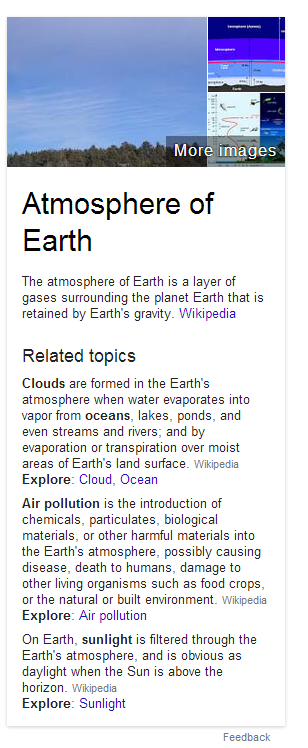
Google's Knowledge Graph boxes now include a list of related topics and some excerpts from articles about them. The related topics are usually linked from the corresponding Wikipedia article.

For example, when you search for [equilateral triangle], Google shows these related topics: Equilateral polygon, Square, Regular polygon, Pythagorean theorem.


Here's another example for [Earth atmosphere]:

Google Geometry Calculator

Donal Trung 3:00 PM Add Comment
Google has an interactive search widget that solves geometry problems. You can search for [solve triangle], [area of a circle], [volume of a sphere], [perimeter of a trapezoid], [area of a pentagon], [hypotenuse calculator], [triangular prism volume], [calculate the diagonal of a cube with 6mm edge], [volume of a cylinder with radius 4cm and height 8cm], [a^2+b^2=c^2 calc a=4 b=7 c=?] and more.


Click the arrow and Google will show you the solution. Click one of the input boxes and the value is highlighted.


"Supported shapes: 2 and 3 dimensional curved shapes, platonic solids, polygons, prisms, pyramids, quadrilaterals, and triangles. Supported formulas and equations: Area, circumference, law of sines and cosines, hypotenuse, perimeter, Pythagorean theorem, surface area, and volume."

{ Thanks, Jonah Langlieb. }

Restaurant Menus in Google Search

Donal Trung 1:49 PM Add Comment
Google mentioned this feature a few weeks ago, but I think it's important enough to write a post about this. If you're in the US and you search for the name of a restaurant followed by "menu", Google will display the restaurant's menu above the list of results.


"Next time you're planning a brunch or a date night, check to make sure the menu has something to satisfy everyone in your group, without having to browse through several restaurants' websites. Just search Google to show you the menu for the eatery you're considering and you can see it right on the top of your search page — complete with tabs for different parts of the menu (like appetizers, brunch or dinner) and, often, prices — before you make your reservation. Menus are available in the U.S. only for now."

Google used to display short answers to simple questions and now it shows full restaurant menus, driving directions, animated widgets with details weather information, long lists of sport results, facts and more.


Google's goal used to be sending people to the most relevant results. Now Google wants to show the best answers and that's the reason why search results are less important. As more and more people use smartphones to search the web, Google has to provide answers, not just search results. Having to open multiple pages, scroll to the right section to find an answer is inconvenient, especially if you are on the go, your internet connection is slow and you don't have too much time.

A Google Experiment Makes Page Titles Bigger

Donal Trung 11:56 AM Add Comment
Google tests a new search interface for desktop that removes underlines from links and increases text size for page titles.


Here's a screenshot that shows both the experimental UI for search results and the standard interface:


{ Thanks, Matt Cleinman. }
Google's Blink Easter Egg

Google's Blink Easter Egg

Donal Trung 6:46 AM Add Comment
There's a new Google Easter Egg: search for [blink html] and the words "blink" and "html" will start to flash slowly. It also works for [blink tag] Google uses CSS3 animations to emulate the <blink> HTML element because it is no longer supported by modern browsers.

"The blink element is a non-standard presentational HTML element that indicates to a user agent (generally a web browser) that the page author intends the content of the element to blink (that is, alternate between being visible and invisible). Despite its initial popularity amongst home users in the 1990s, it has since fallen out of favor due to its overuse and the difficulty it presents in reading," explains Wikipedia.


{ via Search Engine Roundtable and Ilya Grigorik }


Quickly Enable Google SafeSearch

Donal Trung 3:42 PM Add Comment
If you want to temporarily turn on Google's SafeSearch, you can do that without opening the settings page. Just click the gear icon and select "turn on SafeSearch". When SafeSearch is enabled, you'll see a message next to gear button: "SafeSearch on". To disable it, click the same button and select "turn off SafeSearch".


"With SafeSearch, you can help prevent adult content from appearing in your search results. No filter is 100 percent accurate, but SafeSearch should help you avoid most of this type of material," explains Google.

If you're logged in, search settings are saved to your account and used for all devices. You can also go to the settings page and enable "Filter explicit results"

Google's Timer is Back

Donal Trung 7:00 AM Add Comment
Remember the timer feature that was available for a few days last year and then quickly removed by Google? It's back now: it only works in the desktop Google search interface and it now has a full screen option. Right now, it seems to be an experimental feature.

Here are some examples of searches you can use: [set timer for 30 seconds], [set timer for 10 minutes and 10 seconds], [set timer for an hour and a half], [timer for 30 seconds], [timer 30 seconds], [timer 30 sec], [timer 23 hours 59 min 59 sec]. If you search for [set timer] or [timer], Google defaults to 5 minutes.


There's also a fullscreen mode:


Here's a video:


{ Thanks, Jonah. }

Google Search Debug Info

Donal Trung 4:54 PM Add Comment
Sometimes Google's files reveal internal information. Here's some debug info for Google Search: it looks like many search features are actually server-side plugins and Google measures the time taken to load them. There are plugins for social posts, knowledge panels, rich snippets, product ads, forum clusters, Gmail results, health results, hacked sites, hashtags, empty results, science links, Korea features and more. The debug information is provided by a Java plugin (JvmInfoPlugin).

Click the image to see a bigger version.


{ Thanks, Florian K. }

Updated Stock Card in Google Search

Donal Trung 2:20 PM Add Comment
Google's stock card that's displayed when you search for [GOOG], [TSLA], [Microsoft stock] and other similar queries is now a lot bigger. Tabs are placed above the chart and you can get the stock price at any time by mousing over the chart or tapping it.


Drag the dotted line to get the price variation.


Another change is that the links to Google Finance, Yahoo Finance and MSN Money have been removed.

{ Thanks, Jérôme. }

Google Answers Complicated Questions

Donal Trung 9:57 AM Add Comment
Google used to only answer simple questions like "who's the prime minister of Canada?" or "what's the population of China?". Thanks to the Knowledge Graph project, Google can answer more complicated questions like "who played Batman?", "what's the latest album of Celine Dion?", "what are the main attractions in Spain?".

Now Google shows direct answers for even more complex questions, but this seems to be limited to the US. Here's an example of question that doesn't have a definitive answer: "what's the distance between Earth and Mars?". I picked a shorter version of the query: "distance to the Mars." Google shows a snippet from a page that answers the question and highlights the distances. Usually, the page is in the first 10 search results and Google shows an extended snippet.


Here's another question: "why is the sky blue?".


Why is the Red Sea called this way? Google has the answer.


Google also answers: "how many work days in a year?", "who owns Lancia?", "who ended world war 2?", "who celebrates presidents day?", "how many countries are there?".


The answers aren't always accurate and sometimes they're incomplete (Will Smith has 3 kids):


While Google's quick answers are often useful, it's a good idea to check if they're accurate.