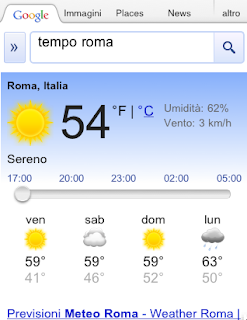
Earlier this year, we introduced interactive weather information in mobile search results and now this feature is available in 33 more languages. Now when you search for ‘météo’, ‘tempo’, ‘날씨’, or ‘weather’ in your language, you’ll see the current temperature, humidity level and wind speed for your location. You’ll also get an overall forecast and the weather outlook for the next few days. To see weather conditions at various times throughout the day, move the slider across the next 12 hrs; that way you’ll know if you’ll need a light jacket in the afternoon or perhaps an umbrella in the evening.
Showing posts with label google+. Show all posts
A new Android Market for phones, with books and movies
Android android market google googlenew
Donal Trung
Recently, we’ve been hard at work improving Android Market to give you new ways to find great applications and games, purchase books, and rent movies. Today, we’re releasing a new version of Android Market which makes all of these available on phones (Android 2.2 and higher).
In the U.S., you’ll be able to rent thousands of movies, starting at $1.99, right from Android Market on your phone. With the Videos app, available in Android Market, there’s no more waiting for downloads, syncing, or worrying about storage space. Simply sign into Android Market with your Google account, and you can rent movies from anywhere – the web, or your Android phone or tablet – and start watching instantly. You can also download movies to your device so they’re available for viewing when you don’t have an internet connection.
Also in the U.S., you can now purchase books from Android Market on your phone. Like movie rentals, books are linked to your Google account, so they’re instantly available across all of your devices – computer, phone, or tablet – without the need for wires or downloads.
You’ll be delighted to find we’ve overhauled Android Market to make it faster, easier, and more fun to discover great apps, movies, and books. We’ve created more space to feature some of the most interesting content of the week on the home page. We’ve added more top charts, with newer, more relevant items, and we’ve made it easy to swipe through these charts as you browse the store. We’ve also introduced new collections of great content, like staff picks and Editors’ Choice apps.
The new Android Market will be rolling out in the coming weeks to Android 2.2 and higher phones around the world. You don’t need to do anything - the update is automatic on supported phones. If you’re in the U.S., you’ll also be able to download the Videos app, rent movies, and buy books once you receive the new Android Market.
Your phone is about to get a lot more interesting! Enjoy the new Android Market.
Posted by Paul Montoy-Wilson, Product Manager
Also in the U.S., you can now purchase books from Android Market on your phone. Like movie rentals, books are linked to your Google account, so they’re instantly available across all of your devices – computer, phone, or tablet – without the need for wires or downloads.
You’ll be delighted to find we’ve overhauled Android Market to make it faster, easier, and more fun to discover great apps, movies, and books. We’ve created more space to feature some of the most interesting content of the week on the home page. We’ve added more top charts, with newer, more relevant items, and we’ve made it easy to swipe through these charts as you browse the store. We’ve also introduced new collections of great content, like staff picks and Editors’ Choice apps.
The new Android Market will be rolling out in the coming weeks to Android 2.2 and higher phones around the world. You don’t need to do anything - the update is automatic on supported phones. If you’re in the U.S., you’ll also be able to download the Videos app, rent movies, and buy books once you receive the new Android Market.
Your phone is about to get a lot more interesting! Enjoy the new Android Market.
Posted by Paul Montoy-Wilson, Product Manager
Finding great deals is easier with Google Shopper 2.0
Android android market google google offers google shopper Google Wallet googlenew
Donal Trung
Today we’re announcing a new set of features in Google Shopper for Android to make it even easier to research products and find great value deals when you’re on-the-go.
First, we’ve moved features around a bit to help you perform common tasks more quickly. For example, the ‘Starred’ and ‘History’ buttons are now at the top of the page. We’ve also added new tabs to the bottom of the screen for fast navigation to Google Shopper’s newest features.
With Google Shopper, you can now find, save and redeem offers at nearby businesses through three tabs:
- Today’s Offer: part of the Google Offers beta program, this tab displays a single offer for discounted goods or services in your area. Today's Offer is currently available in Portland, Oregon, the San Francisco Bay Area and New York, with other cities to follow.
- Nearby Offers: when you click this tab, you'll see offers in the 'Eat' and 'Play' categories which nearby businesses have submitted through Google Places.
- My Offers: for those of us who occasionally misplace coupons or gloss over expiration dates, Google Shopper makes it easy to stay organized. When you come across an offer you like you can save it for later. Your saved and purchased offers appear on this tab and you can see which offers are close to expiring. To take advantage of an offer, just navigate to ‘My Offers,’ select the one you’d like, and click ‘Redeem’. In the future you’ll also be able to access and redeem your saved offers using Google Wallet.
Tap on Today’s Offer, Nearby Offers or My Offers to see great deals.
Visit Android Market to download Google Shopper 2.0, currently available for Android 2.1 and higher devices in the US and UK. If you already have the app installed you’ll automatically receive a notification to update it.
Posted by Richard Hung, Product Manager, Google Shopper team
Improved Google Search for BlackBerry 6.0 devices
BlackBerry google google search for mobile googlenew
Donal Trung
Today we’ve updated the Google search experience for BlackBerry 6.0 WebKit enabled devices. We’ve added a number of enhanced search features integrated throughout the homepage and search result pages, making searching faster and easier on www.google.com, especially on touch-enabled Blackberry devices.
These features and more are available on most RIM OS 6.0+ devices with WebKit browsers like the BlackBerry Torch and BlackBerry Bold 9780, and can be accessed in 20 languages across 70 countries.
To try out the new features, go to www.google.com in your mobile browser. We recommend that you bookmark Google Search to your phone’s home screen, so that Google search is just one click away.
Posted by Ryan Doherty, Software Engineer
Left: Improved homepage with autocomplete and search history as you type.
Right: See more information with search options and enhanced results.
- Enter searches faster: Save time by using autocomplete and search history queries that appear beneath the search box as you type.
- Web search: Find what you're searching for fast. Comprehensive results pages let you see relevant websites, images, videos, news, real-time results and more. Simply click on the arrow button ‘>>’ to the left of the top search box for more refinement options.
- Image search: Swipe through image results quickly and easily on touch enabled devices. Start by selecting ‘Images’ at the top of www.google.com, then enter a search. From there, click on any image to view a larger size.
- Local search: Find restaurants, shops and other popular business categories with a single tap. Start by selecting ‘Places’ at the top of www.google.com, then click on an icon from the Places homepage.
These features and more are available on most RIM OS 6.0+ devices with WebKit browsers like the BlackBerry Torch and BlackBerry Bold 9780, and can be accessed in 20 languages across 70 countries.
To try out the new features, go to www.google.com in your mobile browser. We recommend that you bookmark Google Search to your phone’s home screen, so that Google search is just one click away.
Posted by Ryan Doherty, Software Engineer
Introducing the new Google Docs app for Android
Android Docs google Google Docs googlenew
Donal Trung
(Cross posted on the Google Docs Blog, and Google Enterprise Blog)
Increasingly, people are using mobile phones to access information -- from email to web browsing to editing documents. Part of getting work done on the go is being able to easily access, edit and share content, which is why we’re happy to announce the new Google Docs app for Android.
With this new app it’s easy to filter and search for your content across any Google account, then jump straight into editing docs using the online mobile editors. The app also allows you to easily share items with contacts on your phone, right from within the app.
Increasingly, people are using mobile phones to access information -- from email to web browsing to editing documents. Part of getting work done on the go is being able to easily access, edit and share content, which is why we’re happy to announce the new Google Docs app for Android.
With this new app it’s easy to filter and search for your content across any Google account, then jump straight into editing docs using the online mobile editors. The app also allows you to easily share items with contacts on your phone, right from within the app.
The Docs app also allows you to upload content from your phone and open documents directly from Gmail. You can also add a widget to your home screen for easy access to three core tasks: jumping to your starred documents, taking a photo to upload, or creating a new document with one tap.

And my favorite feature: Using the app and your phone’s camera, you can turn photos with text into editable Google documents with the power of optical character recognition (OCR). Just create a new ‘Document from Photo' or select the camera icon from the widget, and your converted document will appear in your documents list shortly after you snap the picture. You can also convert photos already stored on your phone by sharing them with the Google Docs app. OCR does a pretty good job capturing unformatted text in English but won't recognize handwriting or some fonts - stay tuned, it will get better over time!

The Google Docs app is currently available in English and works on Android 2.1+ phones. Try it out by scanning the QR code below or by visiting Android Market.

Let us know what you think of the new Google Docs Android app in our forum.
Posted by Reuben Kan, Software Engineer
And my favorite feature: Using the app and your phone’s camera, you can turn photos with text into editable Google documents with the power of optical character recognition (OCR). Just create a new ‘Document from Photo' or select the camera icon from the widget, and your converted document will appear in your documents list shortly after you snap the picture. You can also convert photos already stored on your phone by sharing them with the Google Docs app. OCR does a pretty good job capturing unformatted text in English but won't recognize handwriting or some fonts - stay tuned, it will get better over time!
The Google Docs app is currently available in English and works on Android 2.1+ phones. Try it out by scanning the QR code below or by visiting Android Market.
Let us know what you think of the new Google Docs Android app in our forum.
Posted by Reuben Kan, Software Engineer
Listen to more languages in Google Translate for Android
Android google Google Translate googlenew
Donal Trung
(Cross-posted on the Google Translate blog)
Today we launched an update to Google Translate for Android that allows you to listen to translations in several more languages.
We’ve dramatically improved the quality of our spoken translations in over 15 languages, including Russian, Chinese and Portuguese, and added the ability to listen to three new languages: Japanese, Arabic and Korean. Text-to-speech is one of the most popular features of this mobile interface. Whether you’re learning how to say a foreign phrase, or trying to share information with someone in their language, simply tap the Speaker icon after doing a translation and you’ll hear the difference.
With today’s launch, Google Translate for Android supports translation between 58 languages and can speak translations in 24 languages. The application works on phones and tablets running Android 2.1 and above. To download Google Translate for Android, scan the QR code below, or visit us on the Android Market.
Today we launched an update to Google Translate for Android that allows you to listen to translations in several more languages.
We’ve dramatically improved the quality of our spoken translations in over 15 languages, including Russian, Chinese and Portuguese, and added the ability to listen to three new languages: Japanese, Arabic and Korean. Text-to-speech is one of the most popular features of this mobile interface. Whether you’re learning how to say a foreign phrase, or trying to share information with someone in their language, simply tap the Speaker icon after doing a translation and you’ll hear the difference.
With today’s launch, Google Translate for Android supports translation between 58 languages and can speak translations in 24 languages. The application works on phones and tablets running Android 2.1 and above. To download Google Translate for Android, scan the QR code below, or visit us on the Android Market.
Subscribe to:
Posts (Atom)


