Showing posts with label Google Mobile Search. Show all posts

Interactive weather results, now in 34 languages

Donal Trung 3:11 PM Add Comment
Earlier this year, we introduced interactive weather information in mobile search results and now this feature is available in 33 more languages. Now when you search for ‘météo’, ‘tempo’, ‘날씨’, or ‘weather’ in your language, you’ll see the current temperature, humidity level and wind speed for your location. You’ll also get an overall forecast and the weather outlook for the next few days. To see weather conditions at various times throughout the day, move the slider across the next 12 hrs; that way you’ll know if you’ll need a light jacket in the afternoon or perhaps an umbrella in the evening.
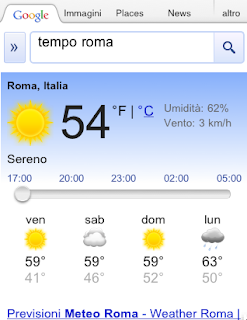


Give it a try by searching Google for ‘weather’ in your language on your Android or iOS mobile device.

Stay connected to the market, wherever you are

Donal Trung 11:20 AM Add Comment
Mobile phones are great for keeping in touch with the latest information, but when there’s a lot of data to look at, a small screen can be a drawback. For financial queries, where you might want to see stock quotes, the latest news, a market overview or portfolio details, we’ve just launched a new approach in Google search.

To try it out, go to google.com on your iPhone or Android-powered device (2.1 or later) and search for your favourite stock ticker symbol.

The first thing you’ll see is an interactive graph shown on a card - you can switch views to different date ranges by tapping on the buttons below the graph.


If you swipe the card from right to left, you’ll get the latest financial news for the company.

Swipe again for a market overview, and if you’re logged in to your Google account and have created a Google Finance portfolio, a further swipe will show a summary of your stock portfolio. Give it a try on your mobile device now to see how it works.

This feature is available in English with support for more languages coming soon. We hope you enjoy it and find it useful.

Instant Previews now available on mobile

Donal Trung 8:47 AM Add Comment
(Cross-posted from the Official Google Blog)

Instant Previews provides a fast and interactive way to evaluate search results. Starting today, Google Instant Previews is available on mobile for Android (2.2+) and iOS (4.0+) devices across 38 languages. Similar to the desktop version of Instant Previews, you can visually compare search results from webpage snapshots, making it easier to choose the right result faster, especially when you have an idea of the content you’d like to see.

For example, if you’re looking for a webpage that has both photos and descriptions, you can use Instant Previews to quickly identify these pages by navigating across the visual search results with a few swipes of your finger. Or perhaps you’re looking for an article, a step-by-step instructions list, or a product comparison chart—with Instant Previews, you can easily spot pages with the right content without having to navigate back and forth between websites and search results. And when the mobile version of a website is available, we’ll show you a preview of the mobile page.


To use Instant Previews on your mobile device, do a search on www.google.com and tap on the magnifying glass next to any search result. A side-by-side comparison view of the webpage previews for the first page of search results will appear. When you find a result you like, tap on the preview to go straight to the website. It’s as easy as finding a recipe for poaching an egg:


You can learn more about Instant Previews for mobile in our Help Center. We hope that you enjoy finding the right result faster with Instant Previews!

Finding the right place when you need it

Donal Trung 2:45 PM Add Comment
Over the past few months, we have launched several new mobile search features for iPhone and Android-powered devices that make it easier to find local businesses. In the US, we launched an “open now” feature which lets you filter local search results to show only businesses that are open right now, based on their listed hours. When you’re hankering for pizza at 1 o’clock in the morning, this can be really handy:

Other local search options available globally include filtering by star ratings (find a highly-rated restaurant for your first date) and by distance (especially handy when you’re on foot).

You may have noticed other improvements as well, like the addition of images, reviews from around the web and bigger buttons for viewing a map or calling a business directly. Each business’s open hours are also shown in the result snippets.

If you haven’t used local search recently, now is a great time to try it out. Just go to www.google.com in your browser, tap on the “Places” link at the top of the page, and do a search. You can also access these features when searching for businesses on Google Maps for mobile on Android devices.

Weather on your mobile phone, now with added fun

Donal Trung 1:40 PM Add Comment
We’d been wanting to build a fun, useful, app-like way to display weather information on our search results pages in the mobile browser. So we pulled together a user experience designer and team of engineers and built a new weather search results snippet that lets you actually play with the results. To try it out, just go to google.com on your iPhone or Android-powered device and search for ‘weather’.

At first glance, you’ll see content that we’d previously shown you before: current conditions and a forecast for the next few days. But by moving the slider over the next 12 hours, you can now see a detailed hour-by-hour breakdown of the changing weather conditions. As you do this, keep an eye on the temperature, wind speed and humidity and see how all these conditions are expected to trend across the day. You may also notice that the background color changes throughout the day. Of course, as you scroll further down you’ll see our regular web search results for your query.

This new weather search experience is available only in English, but we have more updates on the way. We hope you’ll enjoy using it!