Showing posts with label Google Latitude. Show all posts

No More Location History Dashboard

Donal Trung 2:02 PM 1 Comment
Google had a cool feature as part of Location History: a dashboard that displayed how you spend your time, how much do you spend at work or at home, the places you've visited, when you visited each country, your flights, the distance you've traveled (including the number of additional miles to the Moon). This feature, which was launched in 2010 as part of Google Latitude and was still in beta, is gone and the dashboard redirects to the Location History homepage.

Google confirmed that the feature was removed last month: "You can continue to view and manage your Location History information by going to https://maps.google.com/locationhistory/, but we've removed the Location History dashboard (the part of the Location History website that provided a summary of your locations, including total miles traveled and trip information). We are not removing Location History entirely or deleting any raw Location History information. We're continuing to explore more useful and relevant ways for you to engage with and view location history."

Here are some screenshots from Bogdan Bele and guao.hk:


And here are the remaining features:


For some people, the dashboard was one of the main reasons to enable Location History. "I thought the dashboard was a nice record of my travels, and it was the only reason I activated location reporting on my Android phone. If the dashboard has permanently disappeared, then it means that Google is tracking my location for their own purposes, and not giving me anything in return," says Rob Fuller, a reader of this blog.

Location History is actually used by some Google Now cards. "Google Now uses your Location History, which may include locations saved from your use of other Google products, to monitor traffic on your commute route and more," informs Google. There's even a card that shows a summary of your activity. Google Maps also uses it to personalize search results.


{ Thanks, Rob. }

Beyond Google Latitude

Donal Trung 12:43 PM Add Comment
Joe LaPenna, from Google, wrote an interesting post on Google+ about Google Latitude and the future of location sharing. He worked on Google Latitude for 5 years and he'll take Latitude offline in one month.

"We're still working on location sharing and I'm still really happy with G+ Location. Its a rewrite of the Latitude stack but built for a world where social is a layer across all of the Google experience, not just deposited in a corner of Google Maps. In a month, when Latitude goes dark, we'll have G+ Location there, ready for us (Android is ready, iOS is on its way). And what's better is you can share your location with the people that you care about, they can see it on a map and they don't even have to do a single thing. No invites. No emails and links and websites and hooha. They just open G+ click on Location and see your happy face," says Joe.

After unfriending all the 140 people contacts from Google Latitude and switching to Google+ location sharing, Joe noticed something striking: "I don't see as many people on the map as I did before but the difference is quickly and steadily shrinking. I definitely see more people I care about now (three months after G+ Location launched) than I did right after Latitude launched. This whole process really made me aware and confident that building anew was the right thing."

I think it makes sense to move Google Latitude to Google+. Having a separate list of friends you have to manage made sense before Google+ was released, but now it's cumbersome and unnecessary. What doesn't make sense is Google's migration path: instead of adding Google Latitude's features to Google+ and providing a way to import your Google Latitude friends, Google discontinued Latitude and announced everyone that the list of friends will be deleted. Oh, and there's a Google+ location sharing feature, but it only shows a map in the Android app and you'll have to find a way to enable it and add your contacts. Why not automate my instructions from this post and why not discontinue Latitude when there's a decent replacement in all Google+ flavors?


{ via Search Engine Roundtable }

Export Google Latitude Friends

Donal Trung 4:55 AM Add Comment
Google Latitude has been discontinued and a help center article offers more information about this. Unfortunately, there's something inaccurate: "you can't export your friend information out of Latitude".

Well, you can export your Latitude friends because they're added to a hidden Gmail group. Here's how to do that:

1. go to this Google Contacts page

2. select all contacts

3. click "More", then "Export" and click the "Export" button. You'll get a CSV file with all your Latitude friends.


4. (optional) import the contacts to Google+ and use location sharing - Google's Latitude replacement. Go to the People section in Google+, click "connect services" in the left sidebar, select "open address book" and pick the CSV file you've exported. You'll get a list of people you can add to a new Google+ circle (let's call it Latitude). Enable location sharing at the bottom of this page and restrict it to the circle you've created: pick "Custom" and select the Latitude circle. Unfortunately, Google only shows location data on profile pages and in the Locations section of the Google+ app for Android, but that may change in the future.


"Google Latitude will be retired on August 9th, 2013. Products being retired include Google Latitude in Google Maps for Android, Latitude for iPhone, the Latitude API, the public badge, the iGoogle Gadget, and the Latitude website at maps.google.com/latitude. We'll delete your list of friends on Latitude. You won't be able to see or manage friends. Any existing friends will no longer see your location in Google Maps for mobile on Android, Latitude for iPhone, the public badge, the iGoogle Gadget, and the Latitude website at maps.google.com/latitude, if you continue to use these products," says Google.

Location History will continue to be available, since it's used by Google Maps, Google Earth and Google Now. "Google Location History is an opt-in feature that allows you to store your past Google location history and see it on a Google Map or in Google Earth. Your Location History is visible only to you." Location Reporting will also be available, since it "allows Google to periodically store and use your device's most recent location data in connection with your Google Account".

Google Maps 5.8 for Android adds photo uploads, My Places, and more

Donal Trung 12:20 PM Add Comment

Today, Google Maps 5.8 for Android improves Places and Latitude with:
  • Upload photos for a Place
  • My Places as a simple way to manage the Places you’ve starred and recently viewed
  • Descriptive terms for Places in search results
  • Add a new Place on-the-go when checking in
Photo upload for a Place

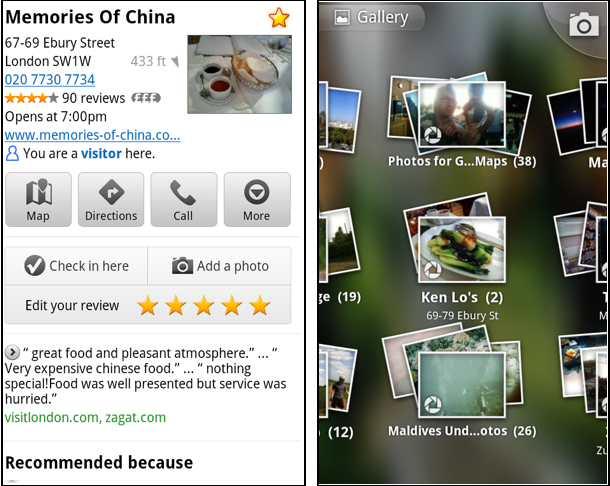
When deciding on a place to go, people often want to know what a place looks like in addition to seeing ratings and reviews. You can now contribute photos to help others get a sense of places. You can now attach your photos to Places, and yours may even become the profile picture for that page. If you want to view or delete any photos you’ve contributed to Places, you can manage uploaded photos in the “Photos for Google Maps” album on your Picasa account.

Left: Uploading pictures to a place. Right: Photos in Android Gallery

My Places and descriptive terms for mobile

In June we announced descriptive terms and ‘My Places’ for the desktop. Both these features are now in Google Maps for mobile. Descriptive terms appear in search results for Places to inform you what businesses are ‘known for,’ such as their ‘eggs benedict’ or being ‘worth the wait.’

Also, My Places for mobile provides quick access to starred and recent Place pages you’ve looked at. You can access My Places by pressing your phone’s menu button while in Google Maps.

Descriptive terms and My Places in Google Maps for mobile

Add a new Place ‘on-the-go’ for check-ins

If you’re out and about and want to check in, we want to make sure you can quickly add a new Place to check into if one isn’t available. This might happen for new businesses or those that haven’t set up a Place page yet. For example, let’s say you’re at Xoogle Xtreme Sports, a new sports shop in your neighborhood. You go to check in but don’t see Xoogle in the list of places to check into and when you do a search still nothing comes up.

Add a Place when checking in, if needed

To solve this, you’ll now see an “Add place” option at the bottom of suggested places. Select that option, and you’ll be prompted to confirm the name and location of the new place. Then a brand new place is added (and you’re checked in). This place will be available for you and others to check into from Latitude, but will not appear as a search result in Google Maps or Google Places.

We’ve also added ‘Bigger text’ to our experimental Labs features and ‘Download map area’ has been renamed ‘Pre-cache map area.’

To start using Google Maps 5.8 for Android, download the update here. This update requires an Android OS 2.1+ device and can be used anywhere Google Maps is currently available. Learn more in our help center.

See your location history dashboard and more with Google Maps 5.3 for Android

Donal Trung 12:35 PM Add Comment
Today, we’re happy to announce Google Maps 5.3 for Android, which lets you see your Google Location History dashboard, check in at “home,” and add your own aspects for places when rating them.

Location History dashboard
If you’ve enabled Location History for Google Latitude, you’ve been able to visualize interesting trends in your location history with a personal dashboard at google.com/latitude on your computer. Now, you can also see your dashboard on your phone by tapping View location history from your Latitude profile. You’ll be able to see right on your phone how far you’ve travelled as well as an estimate of how much time you’ve spent at home, at work, or out.

If you haven’t yet, you can enable Location History from your computer or from Latitude’s Settings menu on your phone. Location History is 100% opt-in and is private to you and nobody else. You can always delete any of your location history from the Manage History tab or correct the estimated work and home locations from the dashboard on your computer.

View your location history dashboard from your Latitude profile on your phone and see estimates of where you’ve spent your time.

Check in at home
Now that you can see how much time you spend at “home”, you might want to let friends know when you’re there. Checking in at places using Latitude is another way to keep a history of places you’ve been and also lets you share when you’re there. I love letting friends and family know when I’m at a cafe or park, but sometimes I want them to know that I’m relaxing at home or made it back safely from a road trip. So now, I can start checking in at “home” in Latitude:
  1. Check in from Latitude and tap “Home - Tap to set your location” at the bottom of the nearby places list if you don’t have one yet.
  2. Use the estimated current address or enter in your home address yourself.
  3. Once you’ve checked in at home once, “Home” will appear at the top of the list when you’re checking in near there.

Like Latitude and other check-ins, checking in at home is entirely opt-in. Your set “home” location is not searchable and only you can check in there. Just like any other check-in, you can choose with whom to share your home check-ins (along with your name and address info).

Add your own aspects for places
When you’re rating places on the go in Maps using Google Places with Hotpot, you could always quickly leave feedback on a specific aspect or characteristic of a place, such as the food or ambiance. Before, we’d automatically include aspects about places that were commonly mentioned in reviews. Now, you can add your own aspects for each place. So if you think a place has a beautiful view or great music, you can add it yourself and quickly share it with the world.

When rating places, you can add your own aspects like “music” for places and leave quick feedback.

To get started, update Google Maps from Android Market on devices with Android OS 1.6+ anywhere Google Maps and Latitude are already available.